Case A · Session theft
Adversary-in-the-middle phishing
A user approved MFA on a phishing proxy. The attacker replayed the stolen session the next day from networks the user had never used.
The Unbounded SOC
Solve the problems you see. Find the ones you don’t.
Alerts answer the problems you can see. The AI SOC closes the gaps you can’t:
Fluency finds and closes each one from your own logs, on your own systems, and keeps doing it as attackers change. From investigating every case to CISO-level reporting on health, gap analysis and certification, it’s the whole operation, not a view of it.
One incident in. Coverage for every tenant out.
One incident in. Coverage for every tenant out.
Attackers change their playbook all the time, so the gaps move with them. Every campaign we have handled, from Storm-2755 to Storm-2372, went through the same six steps: it starts with one real incident, is checked against every tenant’s own history, and ends with tested detections running across the fleet. AI agents do the collection, research, testing and fleet-wide hunting. People make the calls that matter: what is malicious, what ships, and what touches a customer.
Case A · Session theft
A user approved MFA on a phishing proxy. The attacker replayed the stolen session the next day from networks the user had never used.
Case B · Storm-2372
A user typed a device code or approved a broker sign-in for the attacker’s device. No password was ever entered on a fake page.
Case C · Storm-3119
A stolen Global Admin builds an app with tenant-wide rights and a secret. The app then runs the tenant with no user signing in.
01
An analyst’s case, a customer escalation or a threat report someone hands over, never a brainstormed list of what might go wrong. A real incident comes with real logs, and real logs make the later stages provable.
From case A: Why did existing rules raise nothing until the mailbox was already being read?
02
An agent pulls every sign-in, directory audit, mailbox and file record that touches the case and rebuilds the attack minute by minute: a timeline that shows which record proves which step, not a summary.
From case A: The proxy’s own sign-in carried error 90014 after MFA had already succeeded: the earliest reliable signal.
03
The ground truth is set against public reporting and our own past cases. This turns one victim’s story into the attacker’s playbook, so the detection covers the next victim as well as this one.
From case C: The reported app ID is random since 2024, so the rule keys on behavior: create, grant, secret, act.
04
Rules are written as code and run on the real runtime. The incident must fire them, made-up variants must fire them, and normal admin work must not. Mirror sites first, then one real tenant for a day, then the fleet.
From case C, same afternoon: 245 real log lines replayed: identical to the old processor.
05
Once a pattern is understood, an agent hunts for it in every tenant’s history, not only the tenant where it was found. This finds the victims nobody has reported yet, and shows how noisy the rule will be before it ships.
From case C: 30 days, every tenant, no errors. Two lookalike apps were admins’ own tooling, which set the new rule’s levels.
06
Every step of the attack is matched against the rules we already run: covered, covered only on some data sources, or a gap. A fleet survey also finds tenants where an existing rule is switched off or tuned away.
From case C: Three gaps closed the same day; two logged as open and next in line.
Each gap that stays open becomes the starting question for the next incident.
Stage 6, in practice
From the report arriving to a tested correlation rule took under three hours. Three gaps were closed the same day: the missing high-risk permissions, including the one that allows silent password resets; licenses changed by an app; and a correlation on one app. Two more are logged as open, next in line.
Read the research behind the loop →| Attack step | Before | After the loop |
|---|---|---|
| Admin signs in | covered | AiTM, device-code and risky sign-in rules. |
| App created | context only | Feeds the app correlation. |
| Tenant-wide permission granted | alert | Three missing permissions added to the high-risk list. |
| Secret added | context only | Feeds the app correlation. |
| App resets passwords, assigns roles or licenses | gap | New: app license changes; resets and roles marked by actor. |
| The whole chain on one app, over 72 hours | gap | New: app takeover, MEDIUM to CRITICAL. |
| App-only sign-in | gap | Open: hunt only for now. |
| Phishing files shared from SharePoint by an app | gap | Open: next in line. |
What the agents do
Where people stay in charge
Recognized by G2 · Fall 2026
Customer satisfaction and support quality, recognized in G2's Fall 2026 reports.


01 · Investigate and respond
Root cause, response and mitigation
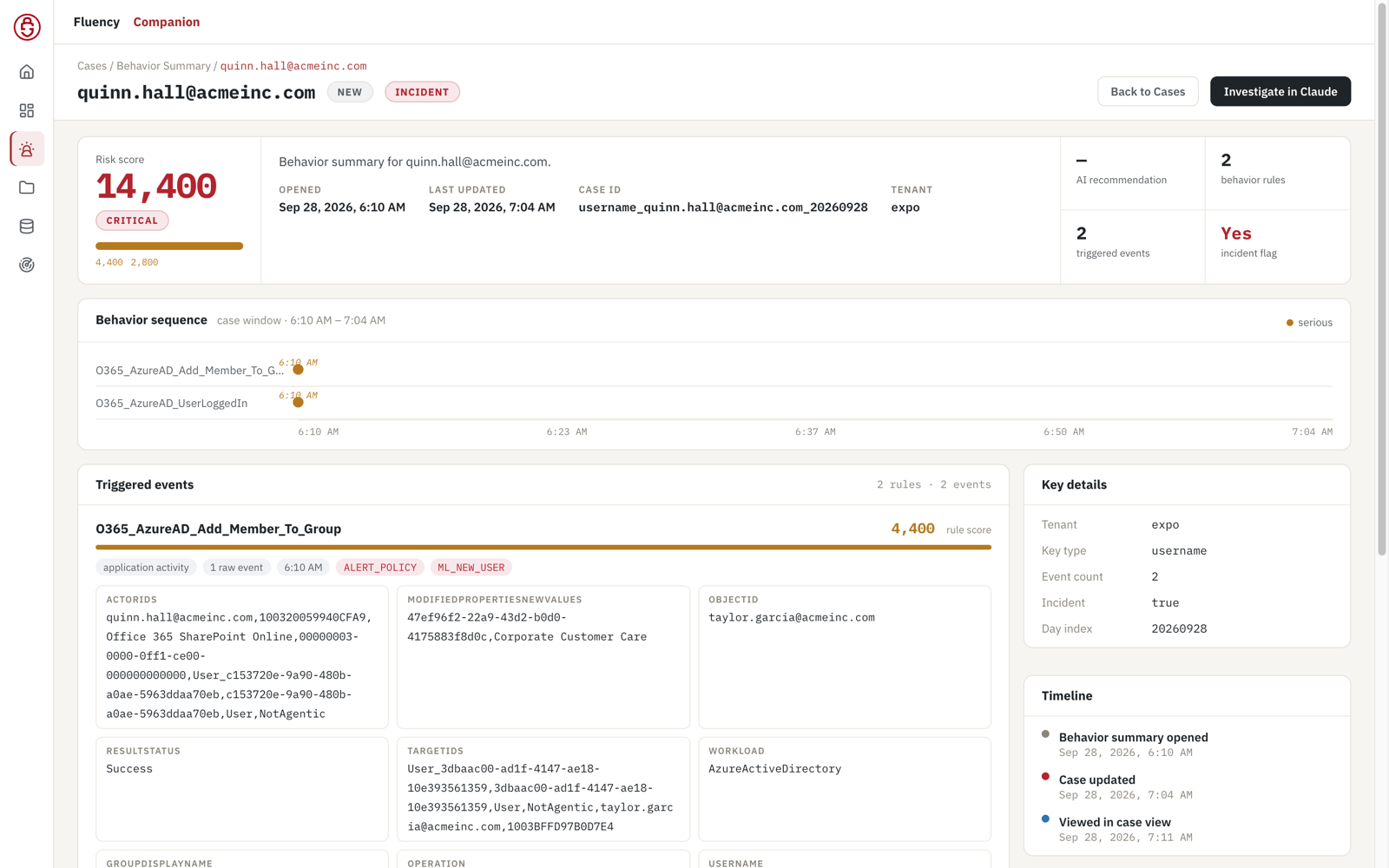
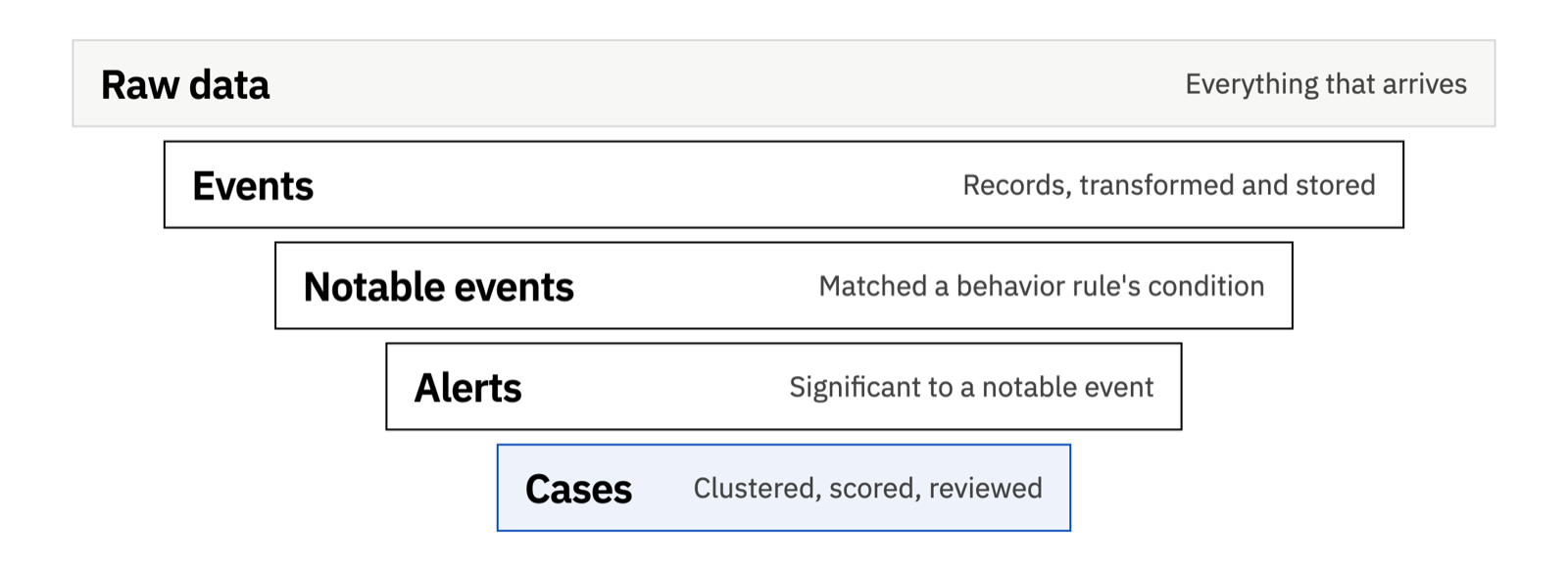
Alerts arrive already grouped into one scored case per entity per day. AI then validates and scopes each case, reconstructs its root cause, drives the response and runs the hot wash, searching every relevant data source in parallel. Whatever the hot wash finds missing becomes the next turn of the learning loop.
Tiers 1–2
Is it real? Is it actionable? Do we see it anywhere else?
Root cause
Reach back through the data to find out why it happened, not just that it happened.
Tier 3
Use all of that analysis to deal with the immediate danger and the long-term one.
Tier 4
What did we miss? Sometimes all we see is the preparation and the after-effects of an attack.
A real case
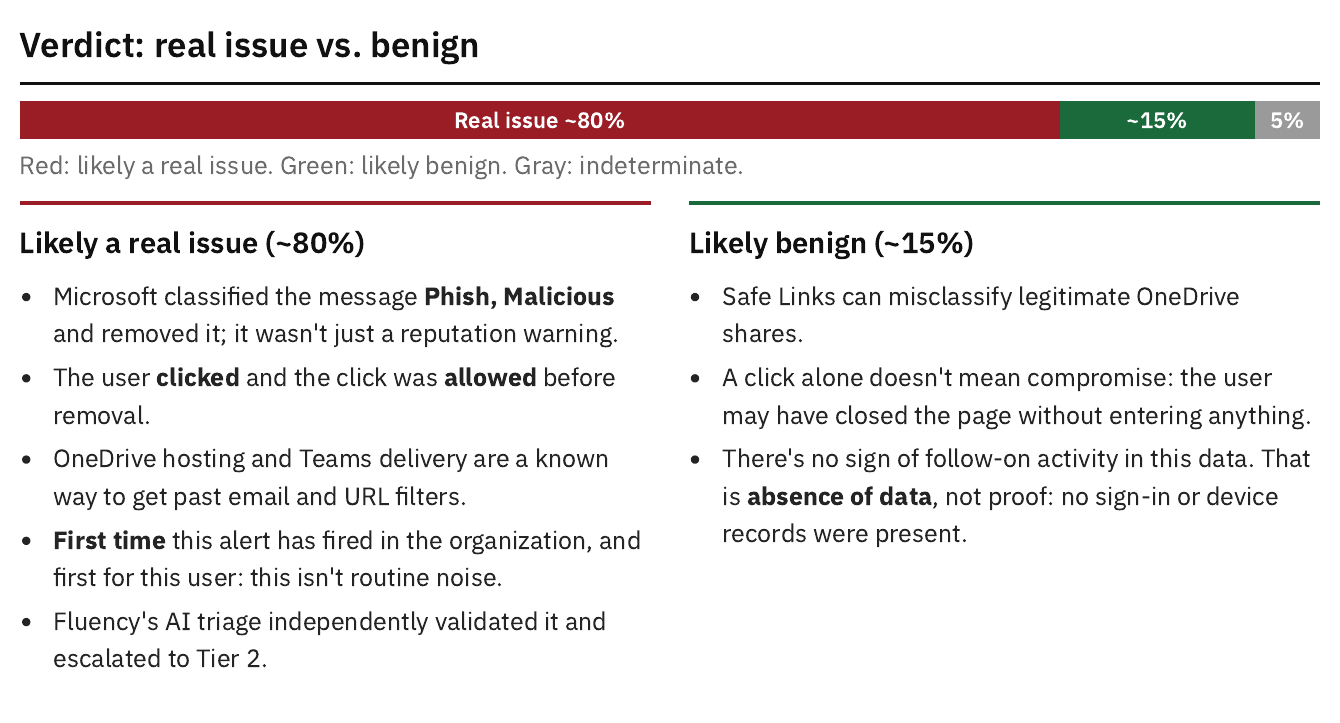
A user clicked a phishing link in Teams, the first time that alert had fired anywhere in the organization: 8,800, Critical. The investigation found Microsoft removed the message 14 seconds after the click, and closed with a quantified verdict, about 80% likely to be real, and the one check left to settle it.
When the evidence shows a stolen Microsoft 365 session being replayed, Fluency AiTM Module revokes the user’s sessions and tokens within seconds. Every other response is recommended with its evidence, for your team or your MSSP to carry out.
Reports · 1
Case Investigation See a sample →
One case from alert to evidence, root cause, verdict and actions.
Technical white paper
Not all AI investigations are the same. Compare an AI-executed playbook with parallel, schema-specific analysis across data lakes. Real security cases show where the verdicts, categorization, and proposed responses differed.
Or just watch the video
02 · Detection engineering
Signatures, behaviors and code
Rules written for someone else’s tools rarely fit yours. Fluency’s behaviors learn each identity’s own history, its countries, networks, devices and actions, so detection fits your environment. Every rule runs in the stream, before anything is written to the database. AI writes and tests the rules, and a person approves every release.
If you can match it
A known pattern in a single record: an error code, a known-bad indicator, a vendor alert.
If the entity changed
Something new for this person or device: a first-time country, network, action or alert.
If it needs a sequence
A different pivot, a chain of steps or real logic, like one app that is created, granted rights, given a secret and then acts.
A person decides: releases reach tenants only after someone reviews the tests and pushes them.
A behavior is a signature plus history: a first-time country, network, action or alert for this person is a far stronger signal than something that happens every day. A case’s score rises only when separate evidence points the same way, so twenty bad logins and a thousand are the same evidence.
Reports · 1
MITRE ATT&CK Coverage See a sample →
Which techniques your detections cover, where the gaps are and what to add.
03 · Threat intelligence
New threat data becomes coverage
New threat reporting is set against the ground truth in our own logs: is this a known actor, which reported steps did we see, and which did we not? Each step is mapped to the record that would show it, and indicators that will not hold are flagged before anyone builds on them.
Case C · Storm-3119
Microsoft’s write-up named a “PnP Management Shell” app. The retired app had a fixed ID, but since 2024 each registration gets a random one. A watchlist of that ID would have missed every new victim, so the detection keys on behavior instead: create, grant, secret, act.
Intelligence feeds the learning loop above: once a pattern is understood, it is hunted across every tenant’s history and checked against every rule we run.
04 · System health
Coverage: every site, every source, every agent
Detection can only work on the data you collect. Fluency checks that your systems send the logs that matter: sources arriving on time and complete, endpoint agents reporting, protected and current, and the machines that are not reporting at all. Each gap gets an owner, and a source that never reports is shown as a collection gap, never as a passing control.
Every Monday at 6:00
“Run the health status report for all my tenants. If any data source is broken or stale, message me the list on Telegram. Otherwise, do nothing.”
From the same conversation, your team can onboard new data sources and close cases. Every change is previewed and confirmed first, and credentials go through a secure intake page, never through chat.
Reports · 4
Data-Source Health and Status See a sample →
Whether every source is arriving on time and complete, across every tenant.
CrowdStrike Falcon Endpoint Health
Protection, reporting and OS currency, and the hosts where risks compound.
SentinelOne Hygiene
Agent check-in, scan policy and the Windows endpoints falling behind.
Microsoft Defender Hygiene
Coverage, antivirus health and configuration breaks, with an owner for each fix.
05 · Posture and exposure
Configuration, identity, data and attack surface
Alongside the activity, Fluency keeps configuration snapshots at least daily: Office 365 users, devices, groups and apps; endpoint agents and OS versions; Defender vulnerabilities and Secure Score; firewall configuration; the latest CVEs. So the gaps in configuration, identity and exposure are found before an attacker finds them.
Reports · 3
Endpoint and Identity Security Posture
Endpoint protection combined with Microsoft 365 and Entra ID identity and device posture.
Microsoft 365 Identity and Access Posture
MFA, privileged roles, OAuth consent, licenses and device operating systems.
External Attack-Surface Footprint
Public assets, open ports, lookalike domains and DNS, mail and web hygiene.
06 · Gap analysis and certification
Know what your evidence actually supports
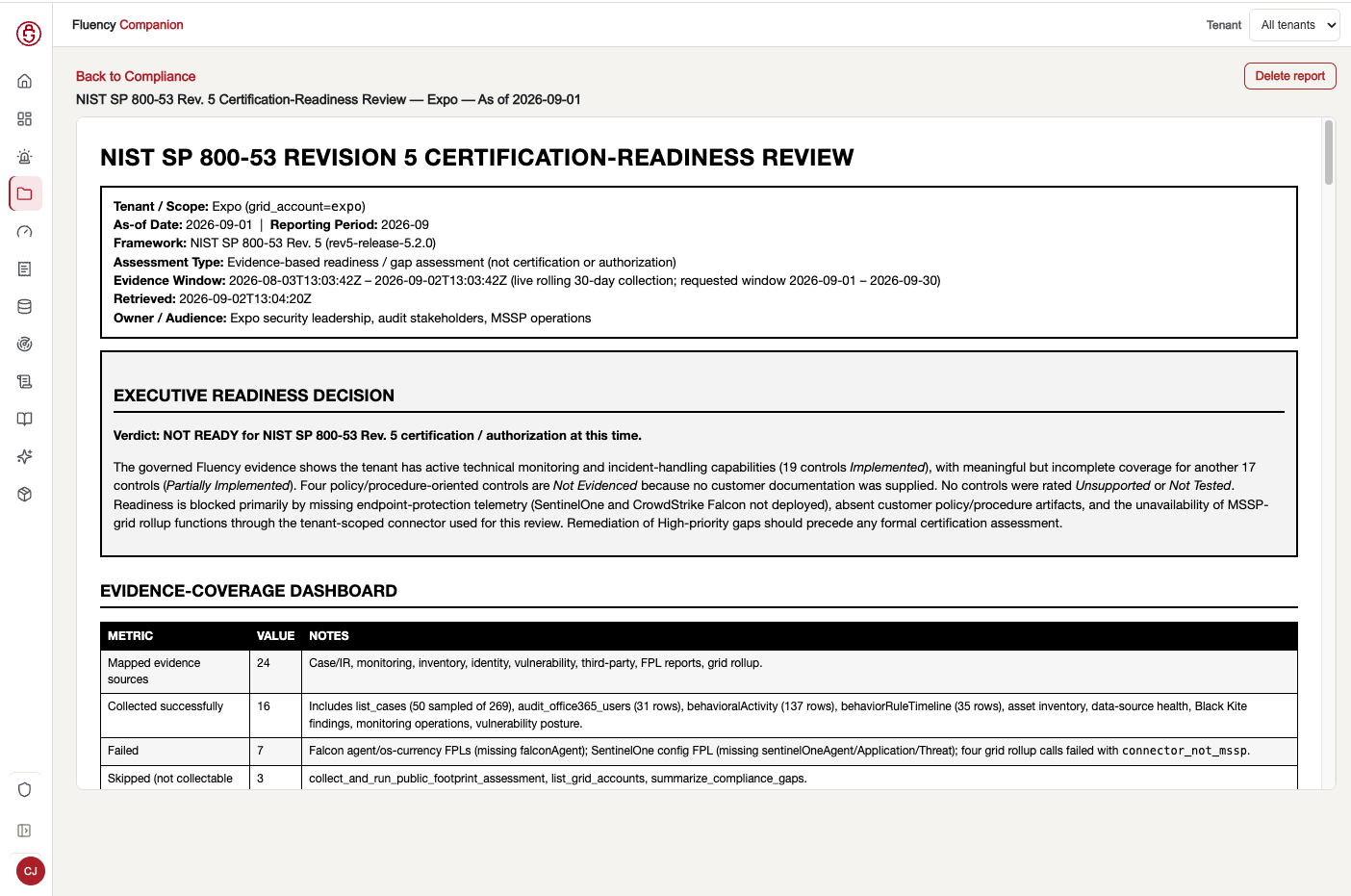
Fluency maps live evidence onto NIST SP 800-53 Rev. 5 and CIS Controls. Each control is marked supported, partial or not observed, with a roadmap to close the gaps.
Fluency supports readiness. Certification decisions stay with your assessor, and it works alongside platforms such as Vanta and Drata.
Reports · 1
CIS Evidence Readiness
How much of a CIS Controls assessment your live evidence supports.
07 · CISO and board reporting
Analyze · forecast · compare
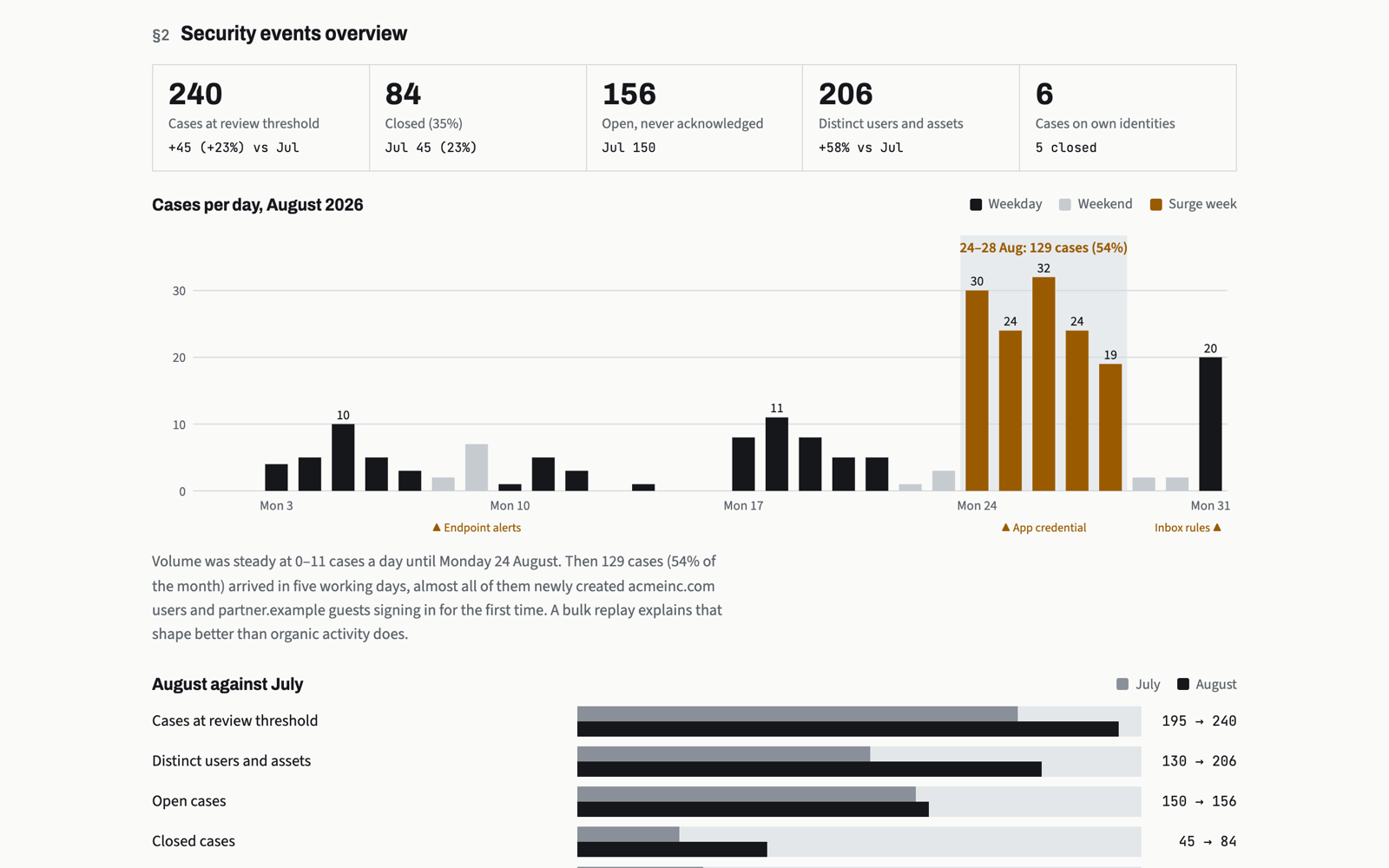
That’s the whole request. The report skill confirms the customer and the month, asks the data 8 to 16 questions about cases, response times, repeat actors and data-source health, and writes an eight-chapter report. Where the data can’t show something, the report says so. Halfway through the next month, ask it to compare: it forecasts the month to its end, analyzes it, and sets it against the last.
“Compare it with July and add recommendations for the board.”
More analysis, for a new audience.
“Format this as a PDF.”
A 16-page, print-ready PDF, checked page by page.
“Post it to Companion.”
Filed in Monthlies for August. Last month’s moves to the archive.
Reports · 1
Monthly SOC Report
An eight-chapter monthly story for the CISO: what happened, the risks, owners and dates.
Why it works
Fluency prepares your data and teaches the agent the job, so Claude, Codex or any MCP client can run your operation, on your systems, with exactly your role and scope.
Structure
Every record is enriched once and detected in the stream, then grouped into one scored case per entity per day, alongside daily configuration snapshots.
Context
Cheat sheets work out which operation you are in and put only its tools and skills in play, so the agent works from current rules instead of guesses.
Action
Skills are recipes for whole jobs, like every report on this page. Tools are governed functions with the data, state and safety built in.
Connect
Every Companion site has its own MCP address. Add it to your agent, sign in with the same Microsoft or Google identity you use for the Companion, and approve. The agent gets exactly your role and scope, nothing more.
Claude Code
claude mcp add --transport http fluency https://<your-site>/mcpThen run /mcp, choose fluency and Authenticate.
Codex
codex mcp add fluency --url https://<your-site>/mcpThen codex mcp login fluency to sign in.
Claude Desktop and Claude.ai
Settings → Connectors → Add custom connector, paste the /mcp address, then sign in and approve.
Any MCP client
Add a remote (streamable HTTP) MCP server with the /mcp address and complete the browser sign-in.
Reports, searches and case reviews change nothing in Fluency.
Anything that changes state is previewed first, needs your explicit confirmation, and is recorded.
Role and scope are checked on every request. One customer or the whole fleet, never mixed in one answer.
Credentials go through a secure intake page. The agent never sees your connector secrets.
Technical white paper
A SIEM behind a fixed interface takes away what AI does best: analyze, forecast and compare. This paper shows how Fluency's MCP teaches Claude or Codex to run the SIEM with cheat sheets, governed tools and skills, through a real Critical phishing investigation and an eight-chapter monthly SOC report.
Or just watch the video · 6:40
How Fluency compares
We compared ten AI SOC platforms on the six capabilities around the shared promise: the evidence a platform keeps, the environment it understands, the reports it delivers and the actions it takes.
| Capability | Fluency | Where it stands |
|---|---|---|
| SIEM foundation | Highest tier, shared with Exaforce: a full data foundation, not an overlay on someone else’s SIEM. | |
| Raw telemetry history | Highest tier: 12 months of raw history by default, not just preserved case summaries. | |
| Configuration intelligence | Highest tier: identities, apps, devices, Defender vulnerabilities and Secure Score, firewall and audit changes. | |
| Customer reporting | The only platform at the highest tier, with a full assessment suite: incident, hygiene, compliance and gap reports. | |
| Hygiene and exposure | Substantial: posture and hygiene reviews across endpoint and identity. | |
| Response automation | By design, findings and recommendations for your team or MSSP to carry out, plus AiTM session revocation. |
Scored 1 to 3 for documented breadth, from published material as of 1 October 2026. A comparison of scope prepared for Fluency, not a laboratory ranking of security effectiveness.
Pricing and scale
Fluency is priced per user, with storage included. You are not penalized for turning on another log source.
$7
per user a month (SMB)
3GB
storage included per user
$2.99
per GB only above the allowance
1 year
retention included
For MSSPs and MSPs
Access is checked two ways on every request: role decides what someone can do (Admin, Operator, CISO, Analyst), and scope decides which tenants they can reach. An MSSP sees every customer under its connectors, an MSP sees a hand-picked set, and a customer sees only itself. Analysts and AI clients inherit exactly that access.
The company behind the product
Fluency combines its SIEM with hands-on deployment and ongoing support. We help customers overcome integration obstacles, establish useful workflows, and build operational capability.
Agree on the first sources, access requirements, and questions to answer. Verify data flow and usable results as onboarding progresses.
For MSSPs, multi-tenant workflows support customer onboarding, health reviews, investigations, and reporting within the appropriate customer scope.
Work with a team that understands the product and the operational obstacles. Fluency was recognized for Best Support in G2’s Fall 2026 reports.
Bring your own data
Start with Microsoft 365. Free for 30 days, no credit card. After the trial, SMB pricing starts at $7 per user a month with a $75 monthly minimum and one year of retention.